 wasdmod for Minecraft Dungeons II
Goodbye, click‑to‑move.
Move like you mean it.
WASD, mouse and keyboard, played as a controller.
Free · Open source · Version 1.4.0
Your keys move the stick.
On keyboard and mouse, Minecraft Dungeons II has you click where to walk. wasdmod gives you the controller moveset instead: smooth movement in every direction, dodges, artifacts and the menu wheel, on the keys you already know.
Menus, the cursor and chat still work with the mouse.
Try it
Press W to play.
WASD to moveClick to attackQ23 for skillsSpace to jump
Hold right‑click and drag: you roll that way.
That’s the Recommended layout. In the Official layout, R or side button 4 rolls, right‑click aims the bow and skills are on 1 2 3. Switch layouts in the demo to try both.
This little playground was made for this page. In the game, the same keys do the same moves.
Highlights
Key layout editor
Choose what every key does.
One screen lists every action with its keys and the game’s own key. Keys that clash are flagged, and a keyboard map shows what each key does. On Windows the editor opens from the setup; on a Mac it’s the app itself.

- Pick a layout. The Official layout, Recommended or one of your own.
- Change a key. Click + key, then press the key you want. × takes one off.
- Clashes are flagged. A key that does two jobs turns red, and a notice at the top says which.
- The game’s own keys. The “game’s controls” follow the game’s own keyboard settings. Change a key in the game and the editor shows it a second later. Until the game’s keys match yours, a checklist shows what to change, and the editor can set them for you once the game is closed.
- Keyboard map. Every key in the colour of what it does: movement, actions, menus and the mod’s own keys.
- Save to game. A running game switches to the new layout within a second.
In game
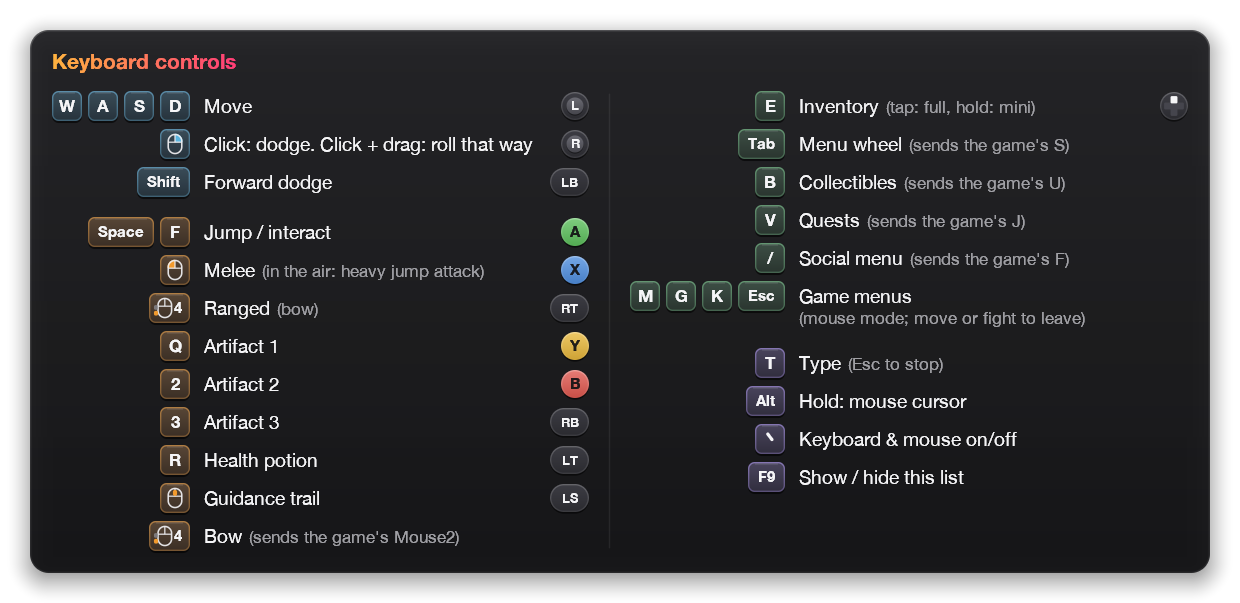
Forgot a key? Press F9.
Your layout appears over the game: every key, what it does and the controller button behind it. It shows for a moment when a new layout arrives, and it follows the game’s language.
Controls
Pick a layout, then make it yours.
The Official layout plays the game’s own keys as a controller, and Recommended is the author’s layout. Drag actions between keys to change either one, then export the result for the app.
Every action and option: Controls on GitHub
Install
Install it in four steps.
- 1
Close the game, run the setup.
Open wasdmod‑1.4.0.exe.
- 2
If Windows warns you.
“Windows protected your PC”: click More info → Run anyway. The setup isn’t code‑signed yet.2
- 3
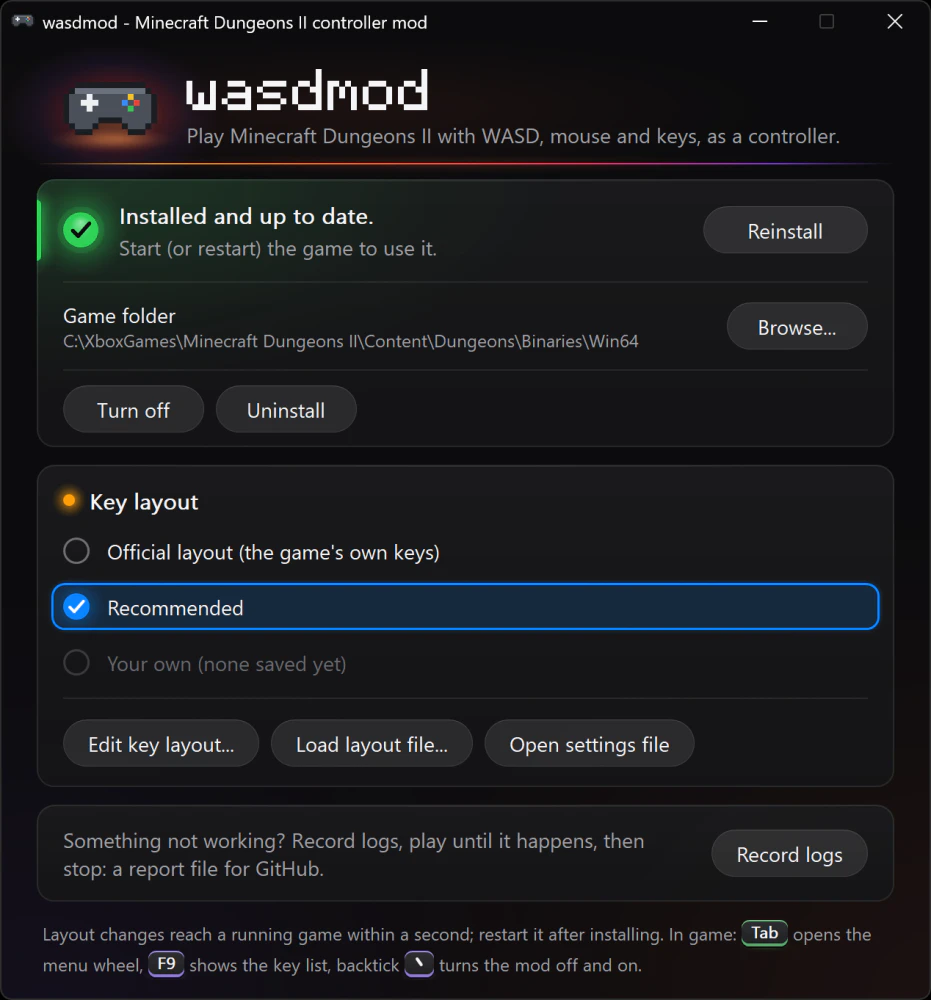
Click Install.
It finds the game in Steam or XboxGames by itself. If it doesn’t, click Browse… and pick
Dungeons‑Win64‑Shipping.exe. - 4
Pick a layout and play.
Choose the Official layout or Recommended under Key layout, then start the game.
- 1
Get the game running in CrossOver.
MCD2 Crossover sets that up, including Steam start‑up and Microsoft sign‑in.
- 2
Drag wasdmod into Applications.
Open wasdmod‑1.4.0.dmg and drag the app across.
- 3
Open it.
If macOS blocks it: System Settings → Privacy & Security → Open Anyway.
- 4
Quit the game, then click Install.
Then start the game. Install also sets up CrossOver for wasdmod, for Dungeons II only.

- 1
Unzip wasdmod‑1.4.0.zip.
The game must already run under Proton.
- 2
Open the game’s folder.
In Steam, right‑click the game → Manage → Browse local files, then open
Dungeons/Binaries/Win64. - 3
Copy the files in.
xinput1_4.dllanddefault.txt, plusauthor.txtfor the Recommended layout. - 4
Set the launch option.
Right‑click the game → Properties → Launch Options, and paste:
- xinput1_4.dllthe mod
- default.txtOfficial layout
- author.txtRecommended layout
Launch Options
WINEDLLOVERRIDES="xinput1_4=n,b" %command%
Release notes and older versions: All versions on GitHub
- 16languages, the same as the game
- 0game files changed
- 1file, next to the game
- <1sto switch layouts mid‑game
- Freeand open source
Tech specs
- Game
Minecraft Dungeons II
Windows: the Steam, Minecraft Launcher and Xbox app versions. Mac and Linux: the Steam version.
- Windows
Setup app: install, turn off, uninstall, pick a layout, open the key layout editor
wasdmod‑1.4.0.exe · about 1.5 MB · not code‑signed yet2
- Mac
macOS 11 or later · Apple silicon and Intel
The game runs in CrossOver (set up with MCD2 Crossover). wasdmod‑1.4.0.dmg · about 1 MB
- Linux & Steam Deck
Proton · manual install · untested1
wasdmod‑1.4.0.zip · about 330 KB
- Layouts
Official layout, Recommended and your own
Edit them in the key layout editor. A running game picks up a saved layout within a second.
- Updates
One click in the app
Update now replaces the app, then updates the mod in the game. The Nexus Mods downloads don’t go online: update them on Nexus.
- Languages
16
English, Deutsch, Español, Français, Italiano, Nederlands, Polski, Português (Brasil), Svenska, Türkçe, Русский, Українська, 日本語, 한국어, 简体中文, 繁體中文
- Price & licence
Free · MIT licence
Source code on GitHub.
- Privacy
Collects nothing
No accounts, analytics or tracking. Privacy policy
Common questions
Does it change the game?
The game’s files stay as they are; wasdmod only adds its own file next to them. It reads your keyboard and mouse and presents them as an Xbox controller. Steam’s “Verify integrity of game files” doesn’t touch it. It does change the game’s own keyboard settings when the key layout editor sets them to match your layout.
Can I still use a real controller?
Yes. Real controllers keep working alongside it.
How do I roll in a direction?
Click the dodge button to dodge the way you’re moving. Hold it and drag the mouse, and you roll the way you drag. The dodge button is right‑click in the Recommended layout, and R or side button 4 in the Official layout.
Why does Windows or my antivirus warn about it?
The exe isn’t code‑signed yet, and a program that reads the keyboard and presses controller buttons looks like other input tools. It’s open source, so you can read the code or build it yourself.
Which versions of the game work?
On Windows, the Steam, Minecraft Launcher and Xbox app versions. On a Mac or Linux, the Steam version, set up with MCD2 Crossover on a Mac or Proton on Linux. Linux is untested.
Which languages?
The same 16 as the game: English, Deutsch, Español, Français, Italiano, Nederlands, Polski, Português (Brasil), Svenska, Türkçe, Русский, Українська, 日本語, 한국어, 简体中文 and 繁體中文. The in‑game key list follows the game’s language.
How do I turn it off or remove it?
In a running game, press backtick (`) to turn it off and on. In the app, Turn Off keeps your layouts and starts the game without wasdmod until you turn it back on; Uninstall removes it for good.
Something doesn’t work. Where do I report it?
Click Record Logs in the app, play until it happens, then Stop & Save Logs and attach the file to an issue on GitHub. Nothing you type is recorded.
